
Android 16: Google’s Latest Attempt at Making Things “Better” (or Just Different?)
Android 16 is rolling out, and surprise, surprise—it features “new” enhancements that may or may not genuinely enhance your experience. We’ve got some exciting insights from the beta, so let’s dive right in.
When’s the Launch of Android 16?
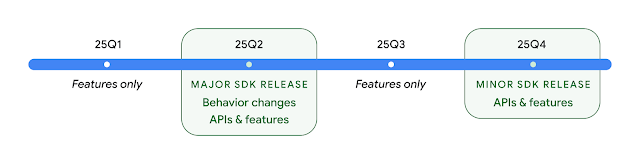
Google is targeting a Q2 2025 release (April-June), which is sooner than expected. Rumor has it they’re syncing it with new hardware rollouts. Supposedly, it will debut on 3 June 2025, landing first on Pixel devices. Expect major Android brands—Samsung, OnePlus, Xiaomi, etc.—to follow when they feel ready.
Which Devices Will Receive It?
Naturally, Google’s own Pixel series will be the first to receive the update. So, if you’re using a device from the Pixel 6 on up, you’re in luck. Other flagship Android devices will get it in due time—though if you own a mid-range or budget phone, you might be waiting until the excitement has worn off.
Android 16’s Alleged “Improvements”
Stackable Widgets
Google might finally allow stacking widgets, just like Apple did five years ago. Better late than never, I guess.
Lock Screen Widgets
They’re reintroducing lock screen widgets after having phased them out years ago. Kind of like when a fast-food chain brings back a popular item just for a limited time.
Notification Summaries
Your device will now attempt to summarize messages using AI. Fantastic, now I can receive a “TL;DR” from friends letting me know they’re running late for drinks.
Customisable Icon Shapes
Because absolutely no one requested it, Google is bringing back the ability to change icon shapes. Look forward to an exhilarating selection of circles, squares, and—breathe easy—rounded squares.
Redesigned Settings
Google is once again tinkering with the Settings app. More icons, more cards, and more confusion.
Updated Status Bar Icons
They’ve modified the Wi-Fi and battery icons. Groundbreaking stuff.
Screen-off Fingerprint Unlock
Now you can unlock your device without having to wake the screen. Truly innovative.
Reworked Quick Settings and Notifications
Rumor has it, Google is separating Quick Settings and Notifications into two distinct panels. Just as you got used to everything, they’re changing it again.
Advanced Protection Mode
A security update aimed at making things “more secure,” which we know typically means more hurdles to access your own device.
Enhanced Find My Device
Supposedly, it’ll be improved at tracking your lost phone. Let’s hope Google remembers where they placed this update.
AI-Driven Features
More AI-driven gimmicks are coming. Anticipate “smarter notifications” and “enhanced battery management.” We’ll see how that pans out.
Press Power Button Twice for Wallet
Now you can double-press the power button to access your digital wallet. Because getting your phone out and tapping was clearly too taxing.
Live Updates
A feature that’ll clutter your status bar with real-time notifications. Good luck noticing anything else.
Summary: Another Android Update to ~Fix~ Ruin Everything
Look, Android 16 may actually bring some worthwhile updates. However, if history has taught us anything, it’s likely to just shuffle things around, break some existing features, and remind you that software updates aren’t always beneficial. Keep an eye out for the full launch in June—provided your device isn’t delayed until 2026.
For more brutally honest tech reviews, visit gadgetlad.co.uk. Cheers.