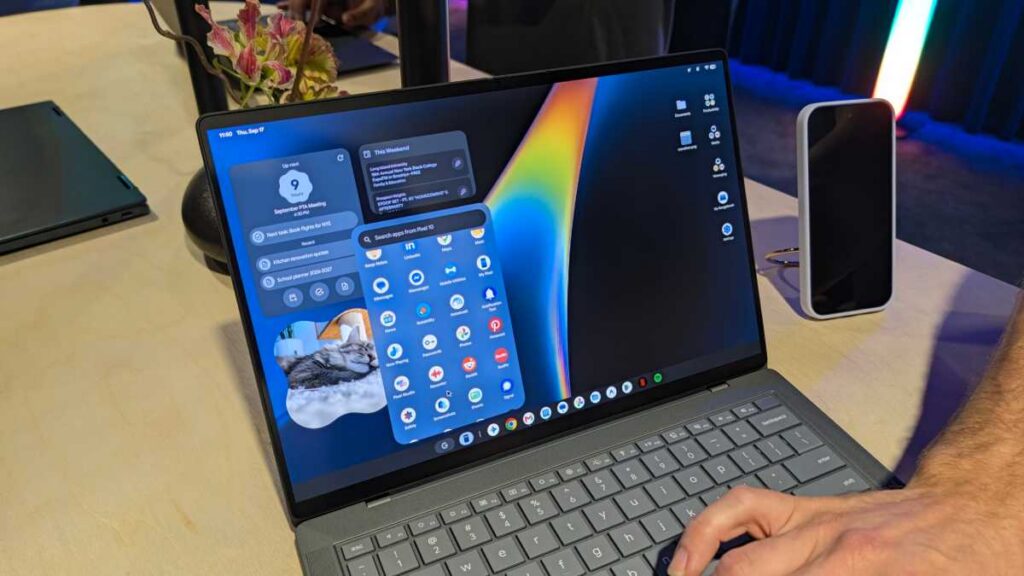

Google’s giving laptops another go, my friend. This time, they’re focusing on Android enthusiasts.
Googlebooks aren’t simply regular Chromebooks, you know. The latest operating system is essentially Android reimagined for desktops, appearing and operating like Android 17 but featuring a user interface designed for larger displays and keyboards.
They’ve dubbed it the Googlebook OS – though you won’t hear Google making a big deal about it – marking the first desktop operating system aimed at genuine integration with Android devices, rather than just existing alongside them.
And it isn’t restricted to just Pixel phones – any Android device running Android 17 or above will be compatible with the entire system. Here are five aspects that could transform the way we interact with our smartphones and laptops.
1. Picking up the pieces
Okay, so it’s a clear imitation of Apple’s ‘Handoff’. But if something is this useful, why not incorporate it?
‘Continue On’ allows you to begin on your Android and seamlessly continue on your Googlebook. Every app from your phone is accessible on your desktop without any trouble.
Google’s giving developers the option to decide if the Googlebook version of their application appears as a phone window or as a standard desktop application. This level of adaptability makes Continue On truly valuable.
2. Files goes the extra mile
It’s 2026, and yet I’m still sending emails to myself. Sharing between Android and Windows is decent, but not exactly intuitive.
The enhanced ‘Files’ app on Googlebooks should change that. By default, your phone and all its contents are readily accessible in the sidebar – no cables or messing about.
Take a picture or download an email attachment on your phone, and voila, it appears on your Googlebook. As the classic compilation albums declare, that’s what I call seamless.
The AI-enhanced search feature can sift through files to locate what you need, even if you’ve given them silly names. Theoretically, this is a revolutionary concept.
3. Cast, but make it fast
We’ve used third-party solutions to run Android applications on Windows for ages, but let’s face it, the experience was disappointing.
‘Cast My Apps’ on Googlebooks aims to enhance that experience. You essentially have access to all your phone’s apps directly on your Googlebook without needing to touch your phone. Only Phone, Camera, and Settings remain restricted due to security.
During my practical assessment, it performed excellently. Google’s demonstration with a one-time security code sent via Messages resolves one of my two-factor authentication problems.
4. Shared notifications
Having notifications separate between an Android device and a Windows laptop is a hassle. Microsoft’s ‘Phone Link’ app falls short with inadequate integration.
In theory, on Googlebooks, notifications should synchronize completely, if you desire. Either your Googlebook or phone can serve as your hub for all your notifications.
No longer will I constantly check my phone or lose connectivity with Link to Windows. I’m eager to bid farewell to those issues.
5. Next-level mobile gaming
Before we start fantasizing, Googlebooks aren’t set to achieve PC-level gaming, and let’s not deceive ourselves. But they are getting closer.
For mobile gaming, any game available on the Play Store can be played on Googlebooks – that’s over 20,000 titles as per Google.
I tried Asphalt Legends with an Xbox controller, and the gameplay and visuals were quite impressive. I’m excited to see what more it can offer.
However, if you’re looking for a console-like experience, Googlebooks are ready for cloud gaming. Each purchase comes with a free year of Nvidia’s GeForce Now, and with the top-notch hardware, they should run games effectively.
Thanks to the integration of Googlebooks with Android devices, Android has finally established its own ecosystem. Check it out.
The first wave of Googlebooks from brands like Acer, HP, Asus, Lenovo, and others is available for pre-order now.
Summary: Geordie Gadget Gab
Google’s entering the scene again with Googlebooks, specifically designed for Android fans. From picking up where you left off to smooth file sharing, and accessing 20,000 games – it’s as if Google has finally got its strategy sorted. Time to hop on board or get left behind.